Overview
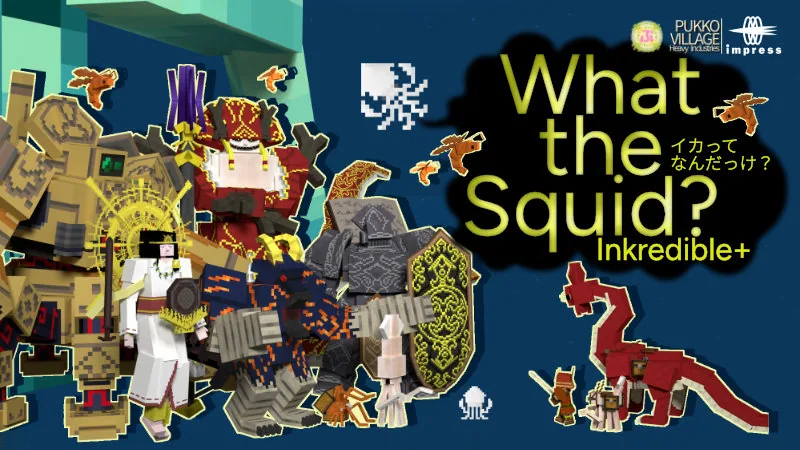
What the Squid?Inkredible+ brings a surreal and comedic twist to Minecraft Bedrock survival. Instead of plain ocean dwellers, your world is populated by more than 70 distinct squid species that you can interact with, catch, tame, and ride across your adventures.
Beyond standard animal taming, the add-on delivers over 150 items, unique world structures, companion pets, and challenging boss encounters. The overall tone is lighthearted and strange, featuring unusual mechanics such as stacking squids alongside hidden secrets scattered throughout the environment.
What you get
- Counted by the store: 1 add-on
- Over 70 kinds of squids that can be caught, tamed, and ridden
- More than 150 items, structures, pets, and bosses
- Squid stacking mechanics
- Hidden secrets to uncover across your world
Price and rating
What the Squid?Inkredible+ is listed at 830 Minecoins on the Minecraft Marketplace as of November 19, 2026. That is roughly $4.87 at the usual US rate for a small Minecoin pack; the real cost depends on which coin pack you buy.
Players rate it 5.0 out of 5 across 7 ratings.
Price history
We started tracking this item on November 19, 2026. No price change has been recorded since then.
Who it is for
This add-on is well suited for players looking for strange comedy, creature collecting, and new survival bosses to fight. However, because it introduces over 150 new elements and bizarre creature designs, it may not appeal to players seeking a realistic or subtle aesthetic for their worlds.
Frequently Asked Questions
Can you tame and ride the squids?
Yes, the add-on allows players to catch, tame, and ride the many different squid types found throughout the world.
Does this add-on include boss fights?
Yes, the pack features dedicated boss encounters as part of its pool of over 150 items, structures, and creatures.
Do the squids have any special mechanics?
Aside from being rideable and tameable, the squids are able to stack on top of each other.
About add-ons in general
What is a Marketplace Add-On?
An Add-On is a Marketplace item containing a resource pack and/or behavior pack that adds things to the game - custom blocks, items, mobs, recipes and mechanics. The category launched in 2024. Unlike a world template, an Add-On is meant to be switched on in worlds you choose.
Can I add an Add-On to a world I already have?
Yes. Edit the world (pencil icon), open Resource packs and Behavior packs, and activate the Add-On there. It works for new worlds too. Make a copy of an important world first: adding or removing packs changes the world.
Source: Minecraft Help: Activate Add-Ons
Do Add-Ons work in multiplayer and on Realms?
Yes - the help center says Add-Ons work in single-player, multiplayer and Realms worlds, but not on personal servers that are not Realms. On a Realm, anyone who joins automatically downloads and applies the Add-Ons active on it. For ordinary (non-Realm) multiplayer worlds the official help does not state whether joining friends must own the Add-On, so try it with a friend before planning around it.
Source: Minecraft Help: Learn about Add-Ons · Minecraft Help: Activate Add-Ons
How many Add-Ons can I use at once?
You can combine several, but the help center recommends no more than three in one world; more can hurt performance or cause conflicts. When two packs change the same thing, the one higher in the list wins, so reordering can fix clashes.
Source: Minecraft Help: Learn about Add-Ons · Minecraft Help: Reorder Add-Ons
Do Add-Ons disable achievements?
Since July 2025 Minecraft says achievements are enabled for Marketplace add-ons (only add-ons from the Marketplace, and nothing is awarded retroactively). The achievements help article, however, still lists "certain Marketplace add-ons" and world templates among the things that can disable achievements. In practice: most add-ons keep achievements on, but check the listing of the specific add-on if achievements matter to you.
Source: minecraft.net: Achievements now work with add-ons · Minecraft Help: Unlock achievements
Do I need to turn on experimental features for a Marketplace Add-On?
There is no player-facing instruction telling you to. Microsoft's guidelines for creators say Marketplace Add-Ons should not use or rely on experimental features, so a Marketplace Add-On is expected to work without those toggles. If one does not work, follow the add-on troubleshooting steps rather than switching experiments on.
Source: Microsoft Learn: Guidelines for building cooperative Add-Ons · Minecraft Help: Troubleshoot Add-On issues
What happens to my world if I remove an Add-On?
You remove it from the world's Resource packs / Behavior packs screen (on a Realm only the owner can deactivate it). Mobs added by the Add-On are removed from the world, and its custom blocks are replaced with default blocks. Back up the world first if you have built with those blocks.
Source: Minecraft Help: Disable Add-Ons
9Minecraft Marketplace is an unofficial tracker and is not affiliated with Mojang or Microsoft. Prices are in Minecoins as listed for the US store and can change at any time; always check the Marketplace page before you buy.